
DOCUO Document Management · AI

Where documents end.
And processes begin.

AI-powered business management, all in one place. Ready-to-use apps—contracts, invoices, quotes—plus no-code custom modules, Kanban workflows, and electronic signatures. The R2AI assistant reads, categorizes, and responds to your documents.

Ready-made apps + custom modules without coding eIDAS-compliant · ISO 27001 · GDPR Microsoft 365 · R2AI
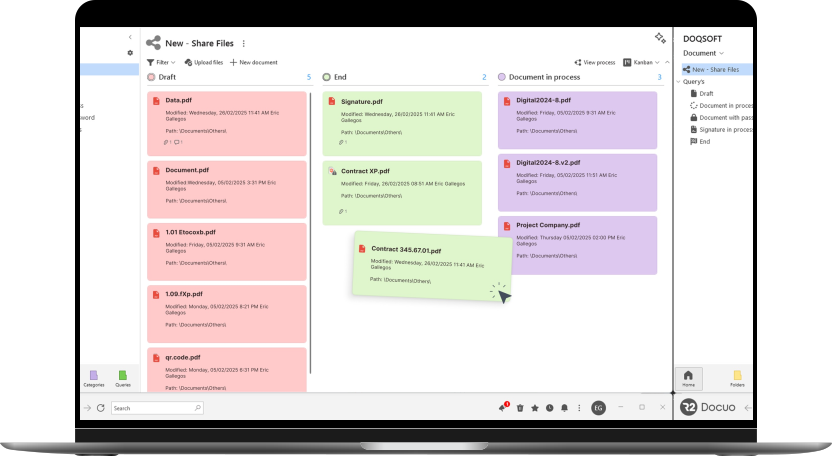
Actual R2 Docuo interface on a laptop: Kanban board for documents (DOQSOFT workspace)

Connect with Your Stack — Microsoft 365, SharePoint, ChatGPT, and an Open API

Microsoft 365 Word 365 SharePoint Microsoft Teams ChatGPT R2AI eIDAS Signature API · ERP Export
Product Tour

Document management, a super-
.

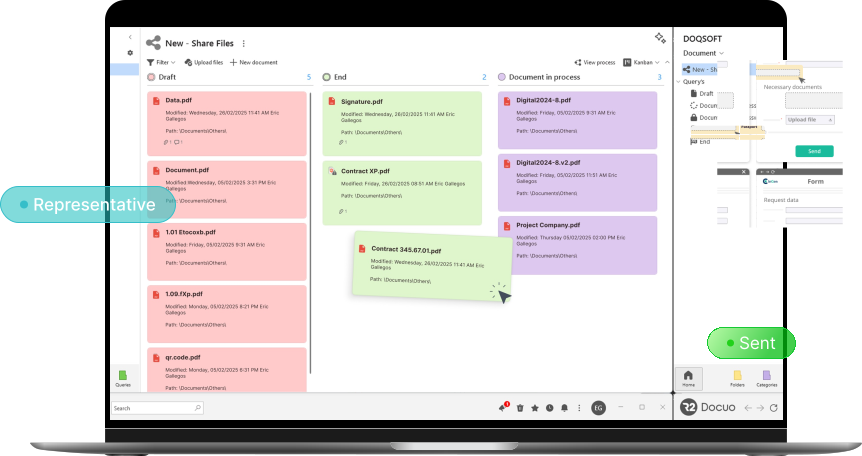
A Kanban board where each document moves through stages—draft, in progress, signed—with saved inquiries, categories, and metadata, and the R2AI assistant just a click away.

Actual R2 Docuo interface on a laptop: Kanban board for documents (DOQSOFT workspace), with data request cards and electronic signatures
Apps and Modules

Ready-to-use apps. Custom modules.
All in one place.

R2 Docuo combines ready-to-use apps with modules that adapt to your operations—from contracts to quality, from HR to engineering—all on a single AI-powered platform.

Ready-to-use apps

Contracts, Invoices, and Quotes up and running from day one. AI reads PDFs, extracts key data, and organizes it for you.

  • Contracts: AI Categorizes Them and Notifies Users of Expiration Dates
  • Purchase and Sales Invoices
  • Offers and quotes, ready to sign

Document Management

The document management system: organizes documents by categories and metadata, not just folders. Saved searches, version control, and secure sharing portals.

  • Categories, metadata, and saved queries
  • Kanban Workflows by Stage
  • Secure Portals for Customers and Employees

Records and Procedures

Convert forms into centralized case files with standardized steps, assigned responsibilities, deadline alerts, and automatic document generation.

  • Forms That Create Records
  • Steps Involving Responsible Parties and Expiration Alerts
  • Document Automation by Process

Custom (low-code)

Create the app your team needs by setting up tables, fields, and workflows—no coding required, just like a spreadsheet with enterprise-grade capabilities.

  • Modules: Quality, Purchasing, Human Resources, Engineering, Auditing
  • Document Generation + Electronic Signature
  • Automation with AI and ChatGPT
No code
Capabilities

Six Pillars for Managing
Your Corporate Information.

Repository + workflows + signing + templates + apps + AI. All in one product—not six different SaaS solutions that you have to integrate.

Inquiries and R2AI

Organize by category and metadata, save custom queries, and ask questions in natural language: R2AI interacts with your documents and takes you to the one you need.

Kanban Workflows

Design step-by-step processes and move each document from one stage to the next—draft, in progress, signed, complete. Any area, any number of steps.

Upload Review Sign

Word 365 Templates

Generate documents from Word 365 templates with conditional paragraphs and fields that automatically populate with data from the file.

{customer} {amount} {start_date}

Electronic signature

Native electronic signature with eIDAS legal validity: multi-device eSignature, eCertificate (digital certificate), and handwritten signature. Real-time status tracking.

NorteCorp · signed 2 hours ago
Acme · pending

No-code app builder

Create internal apps just like you create spreadsheets. No developers, no sprints.

📋 Tickets 🚗 Travel Expenses +12

R2AI · Integrated AI

R2AI reads your documents—PDFs and photos—extracts and populates data, organizes them into folders, and answers your questions by interacting with your repository, all while maintaining the privacy of your data.

"Summarize the Acme v3 contract in 3 points" Summary and key points extracted
How it works

The life cycle of a document.

From upload to archiving. Every step is configurable, every transition is mapped out, and every stakeholder is automatically notified.

01

Capture

Upload your documents or automate document intake with Chronoscan for automatic OCR capture.

Multi-source
02

Ranking

R2AI detects the type (contract, invoice, file), extracts the key data, and places it in the correct category.

Car · R2AI
03

Workflow

Approvals, reviews, signatures. Your workflow defined, executed, and tracked step by step.

Configurable
04

Archive + Inquiries

Document archived with categories and metadata, instantly available from saved queries or by asking R2AI.

Auditable · Traceable
Results · According to R2 Docuo

When the "
" file is no longer the bottleneck.

−70%
Less work involved in creating, managing, and signing documents
~4 weeks
Medium-scale implementation
~10 hours/week
Automated, repetitive work performed by a team
4.7/5
User Satisfaction on G2

Figures published by R2 Docuo (r2docuo.com). Security: ISO 27001 · National Security Scheme (ENS) · GDPR.

Integrations

Live where your team already works.

Microsoft 365, SharePoint, Teams, and ChatGPT. And an API to connect everything else.

Powered by AI

R2AI · the built-in assistant

R2AI accesses your documents to read them, extract data, categorize them, and answer your questions in natural language—all while maintaining the privacy of your data.

  • Read PDFs and photos; extract and fill in data
  • Sort documents into categories
  • Answer questions about your repository
  • Automation with ChatGPT in Low-Code Modules
Microsoft
Microsoft 365 Word 365 SharePoint Teams
AI
R2AI ChatGPT (low-code)
Native electronic signature
eIDAS eSignature eCertificate Handwritten signature
Billing
Verifactu AEAT
And everything else via the API
Documented API Export to ERP
Frequently Asked Questions

The most common questions we get about Docuo.

We address the most common questions about ECM, workflows, electronic signatures, and AI applied to your documents.

What is R2 Docuo, and how does it differ from a traditional document management system?

R2 Docuo is an AI-powered document management system. It combines ready-to-use apps (Contracts, Invoices, Quotes) with customizable modules (document management, case files, quality, procurement, HR) and a low-code builder to create your own. All of this comes with integrated Kanban workflows, eIDAS-compliant electronic signatures, and the R2AI assistant—all in one place, without having to string together four different products.

How is Docuo different from SharePoint, Google Drive, or Notion?

SharePoint and Google Drive are storage solutions with basic search capabilities. Notion is excellent for wikis and documentation, but it is not a document management system. R2 Docuo is designed for processes: version control, categories and metadata, multi-stage Kanban workflows, eIDAS electronic signatures, document generation using templates, and a low-code builder for your own internal processes.

Does Docuo have native electronic signatures? What is their legal validity?

Yes, native electronic signatures (no external third party required) in three formats: multi-device eSignature, eCertificate with a digital certificate, and handwritten signature. Their legal validity is based on the European eIDAS Regulation, and the provider is registered with Spain’s Ministry of Economic Affairs and Digital Transformation. For specific local requirements in your country (for example, NOM-151 in Mexico), please consult us regarding the applicable scenario before signing a contract.

Can I build internal applications in Docuo without coding?

Yes. The “A medida” low-code builder lets you create apps by configuring tables, fields, forms, and workflows—like a spreadsheet with enterprise-grade capabilities, without writing code. It includes document generation, electronic signatures, web forms, and automation with ChatGPT. Operations, HR, and quality teams can build their own processes without involving IT.

How does Docuo integrate with Microsoft 365?

Integration with Microsoft 365: Generate documents from Word 365 templates with conditional paragraphs, a SharePoint connector for automatic export, and availability in Teams. It also features a documented API to connect with your other systems and export journal entries to your ERP.

Does Docuo use AI on my documents? Is my data secure?

Yes. The R2AI assistant—which integrates ChatGPT with Docuo—reads your documents (PDFs and photos), extracts and populates data, classifies them, generates documents, and answers questions about your repository; in addition, custom modules can automate processes using AI. All processing is performed while preserving the privacy of your data. In terms of security, R2 Docuo is ISO 27001 certified, complies with the National Security Scheme (ENS), and is GDPR-compliant. The use of AI is optional for each organization.

How is Docuo licensed? What plans are available?

Subscriptions are based on plans. There are three tiers: One App, All Apps (multi-company and enhanced AI capabilities), and Custom (full-featured document platform, custom fields and workflows, API, and integrations). Electronic signatures and AI tokens are billed on a pay-as-you-go basis. The DOQSOFT team will put together the combination of apps and modules that your operation needs.

Get started with Docuo

Start with the apps
that you already need.

Most popular

Personalized Demo

45 minutes with a specialist. We’ll show you R2 Docuo configured for your operations—contracts, files, quality, or whatever module you need—with your document types.

Schedule a Demo Availability this week
PDF

Download brochure

The complete Docuo brochure: apps, modules, eIDAS electronic signatures, and the R2AI assistant. All in one PDF.

Download brochure Instant download after you register